X570 AORUS MASTER Review
UEFI & Test configuration
General UEFI overview
GIGABYTE’s UEFI has been slightly overhauled with the launch of the X570 motherboards. Slightly because, the top and bottom of the UEFI have received HD treatment, but the rest of the UEFI is as low resolution as it’s always been. It looks like a work in progress, but the little that has changed is appreciated. The real progress with this UEFI is that it is simplified and the grouping of options is much better than it was. These are real positive strides for GIGABYTE presentation without question even though it’s got far to go.
Since this isn’t an overclocking board, there are no memory or overclocking profiles to speak of. Whatever tuning you do; you’ll have to do manually. This isn’t a negative for the CPU side of things, but is a missed opportunity on the memory side. Both ROG and ASRock offer at least three DRAM tuning profiles on their motherboards, to facilitate the lauded improved DRAM overclocking capabilities of 3rd generation Ryzen CPUs. You are literally on your own here if you’re looking to tune memory.
X570 AORUS MASTER UEFI
The quirky bits
The rest of the UEFI is most certainly workable, but one does wish FCLK controls were placed with the rest of the options in the Tweaker tab. As it is, you’ll have to navigate your way to the AMD CBS menu and then another menu within to find these controls.
GIGABYTE has finally added a visual representation of all their Loadline Calibration settings which helps immensely. The only issue here is that there are nine settings, but only six graphs representing them in total. More over, we still have the synonymous or none descriptive such as Auto, Normal and Standard. Naturally, for a system operating at default settings all mean exactly the same thing.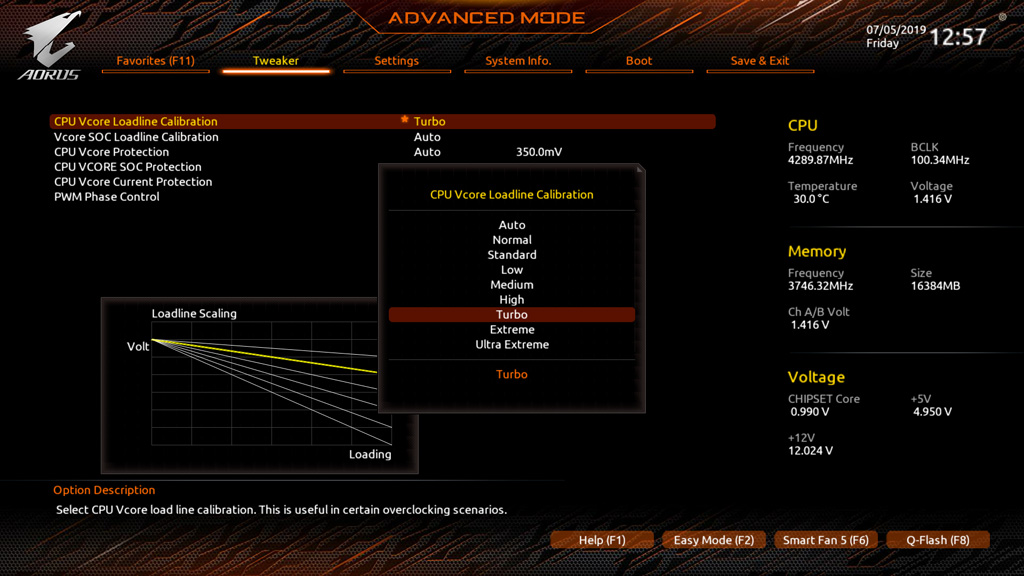
We also have the Turbo, Extreme and Ultra Extreme settings, the last of which is nowhere to be seen on the representative graphs. Overall this UEFI is the best it’s been and it is more than workable but could still be improved upon by some margin. Without question the UEFI and Windows software are the Achilles heel of what is otherwise an impeccable motherboard.
Test Configuration
| Configuration | |
| CPU | AMD Ryzen 5 3600 | 4.275GHz OC 1.42v LLC Turbo |
| Graphics Card | EVGA GeForce RTX 2080 FTW3 |
| DRAM | CORSAIR Dominator Platinum SE 3466 C16 |
| Storage | CORSAIR Force LE 960GB SSD |
| Power Supply Unit | CORSAIR AX1500i |
| Operating System | WINDOWS 10 X64 (1803) |
| Cooling | EK MLC PHOENIX X360 |
As always with motherboard tests, differences between boards tend to be academic for the most part. It is only in situations where there is drastic performance difference that one should be concerned. Any performance differences between boards are usually within the margin of error and as such, one should look to the numbers as performance you should expect, rather than a competition against another board with the same chipset at configured in the same manner.